Volume Equalizer
Auto-normalize loudness in Chrome
Keeps every video and audio at the same comfortable level. No more reaching for the volume knob when ads, trailers, or other tabs suddenly get loud.
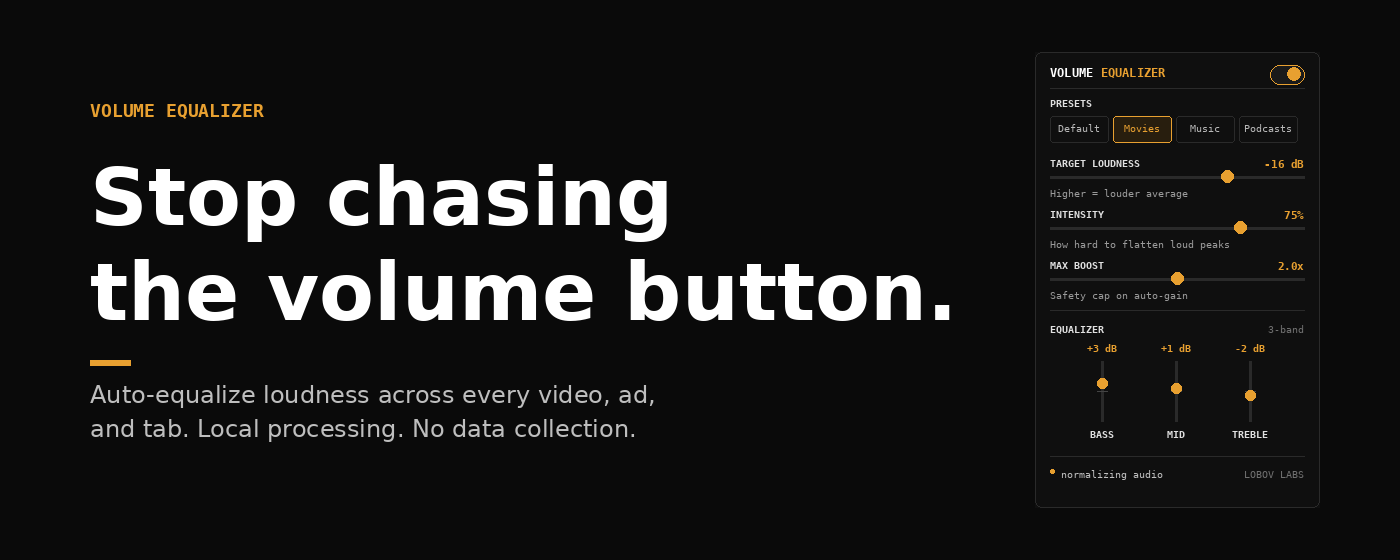
// movies preset -- bass +3, mid +1, treble -2
What it does
Consistent volume, everywhere you listen
When you switch from a quiet podcast to a YouTube ad, the sudden volume jump is jarring. Volume Equalizer measures audio loudness in real time and continuously adjusts the gain to bring everything to a consistent target level. It works on YouTube, Twitch, SoundCloud, Vimeo, and any other site that plays audio in the browser.
This is not a simple volume booster. A volume booster just multiplies the signal, which makes quiet things louder but does nothing about peaks. Volume Equalizer uses a compressor and automatic gain control together: the compressor tames loud peaks within a clip, and the gain control lifts or reduces the overall level to meet your target. Loud ads get tamed. Quiet dialogue gets lifted. The result is audio that stays in a comfortable range without you touching anything.
The processing happens entirely inside your browser using the Web Audio API. Nothing is sent anywhere. The extension makes zero network requests and stores only your settings locally via chrome.storage.local.
Features
What you get
Smart auto-normalization
Measures loudness 10 times per second using RMS analysis and adjusts gain smoothly with no audible clicks or pops.
Dynamic compression
A DynamicsCompressor tames peaks before the gain stage, so sudden loud moments get handled before they reach your speakers.
3-band equalizer
Separate Bass (150 Hz), Mid (1 kHz), and Treble (5 kHz) sliders with +/-12 dB range each. Double-click any band to reset.
Four built-in presets
Default, Movies, Music, and Podcasts. Each preset sets loudness target, compression intensity, boost cap, and EQ in one click.
Safety limiter
A brick-wall limiter at -1 dB sits at the end of the chain and prevents any clipping regardless of EQ or gain settings.
True bypass
One toggle routes the original audio directly to your speakers with zero processing. Use it to A/B compare processed vs. unmodified sound.
How it works
The audio chain, explained
Volume Equalizer intercepts audio from HTML media elements using the Web Audio API and routes it through a processing chain before it reaches your speakers. The chain runs entirely in the browser process with no external calls.
The first compressor handles within-track dynamics. Threshold ranges from -24 dB (Intensity 0%) to -48 dB (Intensity 100%), ratio from 4:1 to 20:1. Attack is fixed at 3 ms; release adjusts with intensity from 100 ms to 250 ms.
Every 100 ms the
AnalyserNode reads a 2048-sample time-domain buffer. RMS is computed over the full frame, then converted to an approximate loudness figure: loudness = 20 * log10(RMS). The error vs. your target loudness is converted to a linear gain multiplier and applied to the GainNode via setTargetAtTime() with a 0.5-second smoothing constant. This prevents abrupt gain jumps. Silence frames (RMS below 0.001) are skipped so the gain does not drift upward into noise.
Three
BiquadFilterNode instances in series. Bass uses a lowshelf type at 150 Hz. Mid uses a peaking type at 1 kHz with Q of 1.0. Treble uses a highshelf type at 5 kHz. Each band is clamped to +/-12 dB.
A second
DynamicsCompressorNode acts as a hard limiter: threshold at -1 dB, hard knee, 20:1 ratio, 1 ms attack, 50 ms release. This is the final safety net that catches any signal that exceeds 0 dBFS after EQ boost or AGC overshoot.
The bypass path is a separate GainNode that connects the source directly to the destination. When bypass is active, the processed chain gain is set to 0 and the bypass gain is set to 1. No processing happens, and the Web Audio graph is not torn down, so toggling back on is instant.
Compatibility
Where it works
Volume Equalizer works on any website that uses standard HTML5 audio or video elements. It hooks into HTMLMediaElement instances via the Web Audio API and also attaches to elements added dynamically, so it handles single-page apps like YouTube and Twitch without any extra setup.
Read more: Why YouTube ads sound louder than videos and how to fix it
FAQ
Common questions
Does it work on Netflix?
Not on the audio itself. Netflix uses DRM (Encrypted Media Extensions) that prevents browser extensions from accessing the audio stream. Volume Equalizer detects this and silently passes the original audio through unchanged. Netflix still plays normally, it just will not be normalized.
Is any of my data collected?
No. The extension collects nothing. It stores your settings (EQ values, loudness target, preset) locally on your device via chrome.storage.local. No servers, no analytics, no tracking of any kind. Read the full privacy policy.
Will it affect audio quality?
Minimal impact. The Web Audio API processes audio at 32-bit float precision internally. The compressor and limiter are designed to be transparent at moderate settings. The Music preset is tuned with low intensity and a small boost cap specifically to preserve dynamics. If you want zero coloration, the bypass mode routes audio with no processing at all.
Does it work on all tabs at the same time?
Each tab runs its own instance of the content script with its own audio chain. Settings are shared across tabs via chrome.storage, so changing the target loudness in the popup applies to all active tabs within a second or two.
Can I use just the EQ without normalization?
The EQ runs as part of the processing chain whenever the extension is enabled. There is no way to use only the EQ while disabling the AGC separately in the current version. If you want flat dynamics with EQ, set Intensity to 0% and Max Boost to 1.0x.
Why does audio on some embedded videos stay unnormalized?
Videos embedded via cross-origin iframes can sometimes load before the content script attaches. The extension monitors for dynamically added media elements and attaches on the first play event, so the next time you play the video it should be normalized.
Why is it called Volume Equalizer and not Loudness Normalizer?
Because it does both. The normalization side handles loudness consistency across clips and sources. The equalizer side handles tonal balance per your preferences. The name reflects the full feature set rather than just one part of it.
No data collection. No accounts. No network requests. All processing is local. Read the privacy policy
Ready to fix your volume?
Free to install. Works immediately after adding to Chrome.
Install for free ->Read: why YouTube ads are louder than videos ->